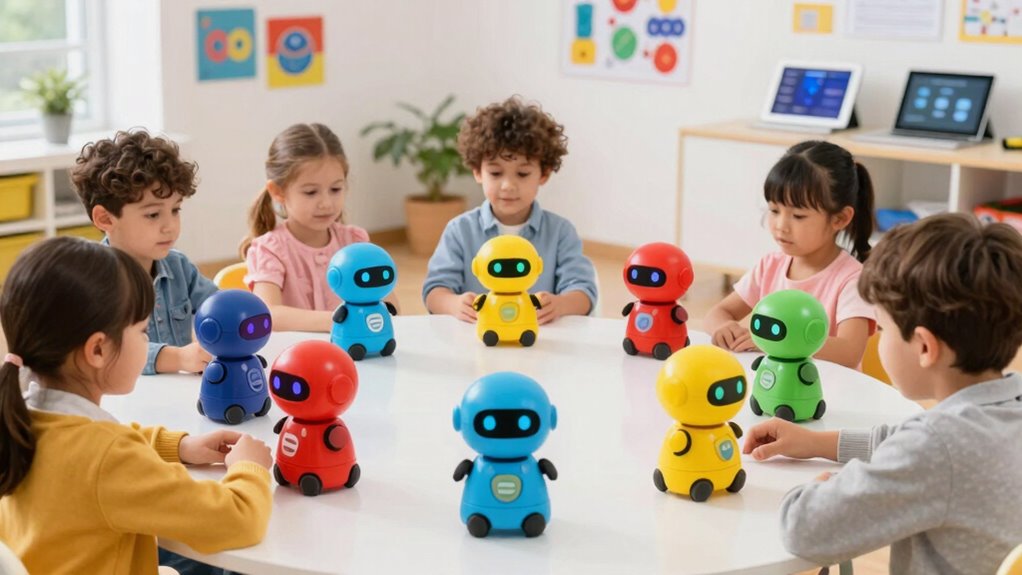

Finding a suitable coding robot for preschoolers involves balancing simplicity, engagement, and educational value. The Learning Resources Botley 2.0 stands out as the best overall choice for its intuitive design and versatile activities. The Apitor Robot Panda offers a screen-free experience ideal for younger children, while the Wonder Workshop Dash Robot is perfect for slightly older kids ready for more advanced coding. Each of these options presents tradeoffs between complexity, price, and learning scope. Keep reading to see how these and other models compare to help you choose the right fit for your child.
Open a free Amazon Business account
Business pricing, bulk buying and tax-exempt orders.
Create a free accountAs an affiliate, we earn on qualifying purchases.
Key Takeaways
- The most versatile options combine intuitive controls with expandable activities, like Botley 2.0.
- Screen-free robots are ideal for preschoolers who need tactile, simple interactions without screen time.
- Budget-friendly choices often sacrifice advanced features but still deliver engaging learning experiences.
- Robots designed specifically for preschoolers tend to have simpler coding methods, emphasizing foundational concepts.
- Choosing a robot with good durability and easy maintenance is essential for active young children.
| Learning Resources Code & Go Robot Mouse Activity Set | 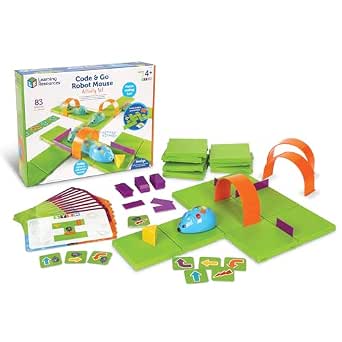 | Best for Screen-Free Early Coding Foundations | Includes: Colby the robot mouse, 16 maze grids, 22 maze walls, 3 tunnels, 30 double-sided coding cards, 10 activity cards, cheese wedge, Activity Guide | Requires: 3 AAA batteries (not included) | Recommended Age: 4+ | VIEW ON AMAZON | See Our Full Breakdown |
| Learning Resources Botley the Coding Robot |  | Best for Versatile Screen-Free Coding Challenges | Recommended Age: 5+ | Includes: Botley robot, remote programmer, detachable arms, 40 coding cards, tiles, obstacles | Programmable Steps: Up to 80 | VIEW ON AMAZON | See Our Full Breakdown |
| Learning Resources Botley 2.0 The Coding Robot Activity Set |  | Best for Growing Coding Skills with Challenges | Number of pieces: 78 | Includes: robot, remote, coding cards, obstacle pieces, boards | Suitable for: Kids ages 5 and up | VIEW ON AMAZON | See Our Full Breakdown |
| Learning Resources Code & Go Robot Mouse |  | Best Basic Intro to Screen-Free Coding for Young Kids | Includes: Jack the robot mouse, 30 double-sided coding cards, Activity Guide | Batteries: 3 AAA batteries (not included) | Features: Lights up, makes sounds, 2 speeds | VIEW ON AMAZON | See Our Full Breakdown |
| Learning Resources Botley 2.0 The Coding Robot |  | Best for Elementary-Level Coding with Active Play | Brand: Learning Resources | Age Range: Elementary | Number of Packs: 1 | VIEW ON AMAZON | See Our Full Breakdown |
| Wonder Workshop Dash Robot – Coding Robot for Kids 6+ |  | Best Overall for Versatile, App-Driven Learning | Age Range: 6-11 | Battery Life: Up to 5 hours | Includes: Dash robot, 2 building brick connectors, USB charging cable | VIEW ON AMAZON | See Our Full Breakdown |
| Learning Resources Botley The Coding Robot Activity Set – 77 Pieces, Ages 5+ |  | Best for Screen-Free, Hands-On Coding Play | Pieces: 77 | Ages: 5+ | Batteries: 3 AAA for Botley, 2 AAA for remote (not included) | VIEW ON AMAZON | See Our Full Breakdown |
| Apitor Robot Panda Screen-Free STEM Coding Robot for Preschoolers Ages 4-6 |  | Best for Young Preschoolers with Simple, Tactile Programming | Brand: Apitor | Model Name: Robot Panda | Included Components: Robot Panda, 36 coding cards, 12 activity cards, forest map, guide card, user guide | VIEW ON AMAZON | See Our Full Breakdown |
| coding robot for preschooler | Includes |
|---|---|
| Learning Resources Code & Go R | Colby the robot mouse, 16 maze grids, 22 maze walls, 3 tunnels, 30 double-sided coding cards, 10 activity cards, cheese wedge, Activity Guide |
| Learning Resources Botley the | Botley robot, remote programmer, detachable arms, 40 coding cards, tiles, obstacles |
| Learning Resources Botley 2.0 | robot, remote, coding cards, obstacle pieces, boards |
| Learning Resources Code & Go R | Jack the robot mouse, 30 double-sided coding cards, Activity Guide |
| Learning Resources Botley 2.0 | — |
| Wonder Workshop Dash Robot | Dash robot, 2 building brick connectors, USB charging cable |
| Learning Resources Botley The | — |
| Apitor Robot Panda Screen-Free | — |
More Details on Our Top Picks
Learning Resources Code & Go Robot Mouse Activity Set
This set stands out for its hands-on, screen-free approach to teaching basic programming concepts to preschoolers. Unlike Botley 2.0, which offers more complex challenges, the Robot Mouse focuses on simple maze navigation that’s perfect for introducing sequencing and problem-solving without overwhelming younger children. Its interactive lights and sounds make learning engaging, but the small maze size could limit classroom use. The activity set is ideal for parents and educators seeking a tactile, straightforward introduction to coding for children as young as 4.
Tradeoffs include its reliance on batteries and limited complexity, which means it’s great for beginners but not suited for more advanced learners.
Pros:- Encourages early coding and problem-solving skills
- Screen-free, hands-on learning experience
- Suitable for classroom, homeschool, and after-school use
- Interactive with lights, sounds, and multiple speeds
Cons:- Requires 3 AAA batteries (not included)
- Limited to basic programming concepts suitable for young children
- Maze size may be small for some classroom setups
Best for: Families or teachers introducing coding concepts to 4-year-olds in a classroom or home setting who want a tactile, screen-free experience.
Not ideal for: Parents looking for more advanced coding challenges or children who need a larger maze area for group activities.
- Includes:Colby the robot mouse, 16 maze grids, 22 maze walls, 3 tunnels, 30 double-sided coding cards, 10 activity cards, cheese wedge, Activity Guide
- Requires:3 AAA batteries (not included)
- Recommended Age:4+
- Dimensions:20″ x 20″ maze board
Our verdict“This set is perfect for introducing preschoolers to coding through tactile play in small-group or home settings.”
Learning Resources Botley the Coding Robot
Compared with Botley 2.0, this version offers a more compact, straightforward coding experience ideal for children starting at age 5. Its remote programmer and variety of coding cards promote critical thinking, but it lacks some of the expanded challenge options seen in Botley 2.0’s larger set. This robot is well-suited for children new to coding who enjoy active, physical play rather than complex programming tasks. While it encourages STEM learning without screens, the interface is quite basic, which may limit engagement for slightly older or more experienced kids.
Tradeoffs involve its simplicity, which makes it accessible but less expandable for children seeking more advanced coding challenges.
Pros:- Encourages screen-free coding and STEM learning
- Includes a comprehensive kit with accessories for varied challenges
- Suitable for different skill levels and ages
- Easy to set up and use
Cons:- Requires manual setup and supervision for younger children
- Limited to physical play without app support
- Basic programming interface may not satisfy advanced users
Best for: Parents and educators wanting an accessible, screen-free coding robot for children aged 5+ that can grow with basic challenges.
Not ideal for: Families seeking a robot with advanced programming features or app integration for older children or more complex projects.
- Recommended Age:5+
- Includes:Botley robot, remote programmer, detachable arms, 40 coding cards, tiles, obstacles
- Programmable Steps:Up to 80
- Features:Loops, if/then logic, obstacle navigation
Our verdict“This robot makes a solid choice for introducing children to coding in a versatile, hands-on way for ages 5 and up.”
Learning Resources Botley 2.0 The Coding Robot Activity Set
This edition enhances the original Botley with more challenges and expandability, making it ideal for children who are ready for slightly more complex problem-solving. Compared to the simpler Botley model, the 2.0 version offers more pieces and challenges, helping kids develop planning and logic skills. However, its complexity may require adult supervision for the youngest learners, and some may find it overwhelming. Its multisensory features like lights, sounds, and music keep children engaged, though it remains within basic coding concepts suitable for early learners.
Tradeoffs include the larger set and added complexity, which might be less suitable for absolute beginners or very young children just starting out.
Pros:- Engages children with multiple challenges and expandability
- Includes a variety of interactive features like lights and sounds
- Promotes creativity and critical thinking
- Suitable for children ready for more complex tasks
Cons:- Requires adult supervision for setup and guidance
- Might be too complex for initial early learners
- Relatively higher price point for the number of pieces
Best for: Parents and teachers seeking a more challenging, expandable coding set for children aged 5+ who are ready to advance beyond basic coding tasks.
Not ideal for: Families with very young children or those seeking a simple, quick-start coding toy without many challenges or pieces.
- Number of pieces:78
- Includes:robot, remote, coding cards, obstacle pieces, boards
- Suitable for:Kids ages 5 and up
Our verdict“This set is best suited for children aged 5+ who are ready for more involved coding challenges and creative problem-solving.”
Learning Resources Code & Go Robot Mouse
This simpler version of the Robot Mouse is perfect for children as young as 4, providing a straightforward, screen-free way to learn sequencing and problem-solving. It’s less complex than Botley 2.0 or the newer Botley 2.0 set, making it ideal for absolute beginners. The interactive lights and sounds support engagement, but its basic functions mean it won’t challenge children seeking more advanced coding tasks. The limited number of coding cards and features can require additional sets to expand play, which could be a downside for ongoing interest.
Tradeoffs involve its simplicity, which makes it accessible but less flexible for children ready to progress beyond initial coding concepts.
Pros:- Encourages early STEM learning through interactive, screen-free play
- Includes multiple coding challenges with double-sided cards
- Supports development of logic, sequencing, and problem-solving skills
- Affordable and easy to use
Cons:- Requires 3 AAA batteries (not included)
- Limited to basic coding functions
- Additional sets needed for expanded play
Best for: Families with preschoolers or early learners who need a simple, engaging, and affordable introduction to coding without screens.
Not ideal for: Children who are ready for more complex challenges or who want a robot with expandability and multiple coding methods.
- Includes:Jack the robot mouse, 30 double-sided coding cards, Activity Guide
- Batteries:3 AAA batteries (not included)
- Features:Lights up, makes sounds, 2 speeds
Our verdict“This robot provides a simple, engaging entry point for preschoolers beginning their coding journey at home or in early education settings.”
Learning Resources Botley 2.0 The Coding Robot
Botley 2.0 offers a comprehensive, active coding experience designed for children as young as 5. It combines multiple coding methods and a large activity set, making it suitable for children ready to explore planning and problem-solving in greater depth. Compared to the earlier Botley model, it provides more interactive features and a wider range of challenges, but it requires 5 AAA batteries (not included) and has no included warranty, which could be a concern for long-term use. Its basic coding functions might not satisfy kids seeking advanced programming, but it’s excellent for fostering active, screen-free STEM learning.
Tradeoffs include the larger set and higher battery requirement, which could be a consideration for portability and ongoing costs.
Pros:- Screen-free coding promotes active learning and critical thinking
- Multiple coding methods and interactive features enhance engagement
- Includes a comprehensive activity set for varied STEM challenges
- Suitable for children ready for more complex tasks
Cons:- Requires 5 AAA batteries, not included
- Limited to basic coding interactions
- No warranty coverage included
Best for: Parents and educators seeking a robust, activity-rich coding robot for children around elementary age who enjoy active, hands-on challenges.
Not ideal for: Families looking for a simple, low-cost starter robot for preschoolers or children seeking advanced coding features beyond basic interactions.
- Brand:Learning Resources
- Age Range:Elementary
- Number of Packs:1
- Manufacturer Warranty:No Warranty
- Global Trade ID:0076502302941
Our verdict“This robot caters well to elementary-aged children who are ready for more complex, active STEM challenges in a screen-free format.”
Wonder Workshop Dash Robot – Coding Robot for Kids 6+
The Dash Robot stands out for its engaging, app-based programming that makes coding feel like a game for children aged 6-11. Compared with Apitor Robot Panda, Dash offers a wider range of activities like singing, dancing, and obstacle navigation, making it more dynamic, but it lacks a camera, limiting some advanced features. Its compatibility with multiple devices and ready-to-use design appeal to parents seeking a straightforward, versatile STEM toy. However, reliance on apps and voice commands means it’s less suited for kids who prefer tactile play or limited screen time. The 5-hour battery life is decent but may require frequent recharging during extended sessions. Overall, this pick is ideal for families who want a robust, interactive robot that can grow with their child’s coding curiosity.
Pros:- Wide variety of engaging activities like singing, dancing, and obstacle navigation
- No assembly required, ready to use immediately out of the box
- Compatible with multiple learning apps for versatile coding experiences
Cons:- No camera or advanced sensors for more complex interactions
- Battery life can vary depending on usage, requiring frequent recharges
Best for: Parents seeking a highly interactive, app-enabled robot that covers a broad range of activities for children 6 and up.
Not ideal for: Families who prefer screen-free, hands-on coding experiences or have limited device access, as Dash heavily depends on apps and voice control.
- Age Range:6-11
- Battery Life:Up to 5 hours
- Includes:Dash robot, 2 building brick connectors, USB charging cable
- Connectivity:App-enabled via iOS, Android, Fire OS
- Features:Voice activated, programmable, obstacle navigation, singing, dancing
Our verdict“Best suited for families wanting an engaging, app-driven coding robot that entertains and educates across a broad age range.”
Learning Resources Botley The Coding Robot Activity Set – 77 Pieces, Ages 5+
The Botley Coding Robot Activity Set offers a screen-free approach to coding, making it ideal for kids aged 5 and up who benefit from tactile, physical play. Unlike the Apitor Robot Panda, which focuses on programming through buttons and cards, Botley emphasizes problem-solving with obstacle courses and remote control, providing an active, collaborative learning experience. Its 77-piece set encourages creativity and critical thinking but requires batteries (not included), which can be inconvenient. While it covers basic coding concepts well, it isn’t suitable for children ready for more advanced programming. The set’s durability and educational focus make it a strong choice for early STEM development, especially in classroom settings. This product is perfect for parents seeking a simple, screen-free introduction that fosters hands-on skills.
Pros:- Screen-free design reduces dependence on devices and promotes active, physical play
- Includes a comprehensive set of building and coding challenge components
- Encourages collaboration and problem-solving in group settings
Cons:- Requires 5 AAA batteries (not included), adding to setup inconvenience
- Limited to basic coding functions, not suitable for advanced learners
Best for: Parents and teachers looking for an engaging, screen-free coding experience for children aged 5-8 that promotes active learning.
Not ideal for: Kids who are already familiar with basic coding or those seeking more complex programming features, as Botley’s capabilities are limited.
- Pieces:77
- Ages:5+
- Batteries:3 AAA for Botley, 2 AAA for remote (not included)
Our verdict“Ideal for early learners who thrive on hands-on, screen-free coding activities that develop foundational skills.”
Apitor Robot Panda Screen-Free STEM Coding Robot for Preschoolers Ages 4-6
The Apitor Robot Panda caters specifically to children aged 4-6, offering a straightforward, screen-free programming experience through physical buttons and a set of colorful coding cards. Compared with Botley, the Panda provides a more interactive experience through its included activity cards and forest map, which make learning feel like a puzzle. Its simple interface is ideal for very young children beginning to grasp basic coding concepts, but it may be too basic for older kids or those with prior coding experience. The inclusion of sensing and looping features adds some complexity, yet it remains limited without advanced programming. The compact size and affordable price make it a suitable early STEM gift, especially for parents wanting a tactile, screen-free toy that encourages problem-solving.
Pros:- Screen-free design reduces screen time and fosters tactile learning
- Includes a rich set of activity cards and a forest map for engaging puzzles
- Compact size and lightweight for easy handling and storage
Cons:- Requires 3 AA batteries (not included), which may be inconvenient
- Limited to basic coding functions, not suitable for more advanced learners
Best for: Parents of preschoolers aged 4-6 seeking a simple, screen-free coding toy that promotes cognitive development and hands-on play.
Not ideal for: Children above age 6 or those seeking more advanced programming options, as the Panda’s capabilities are quite basic.
- Brand:Apitor
- Model Name:Robot Panda
- Included Components:Robot Panda, 36 coding cards, 12 activity cards, forest map, guide card, user guide
- Age Range:4+
- Size:5 x 4.3 x 2.4 inches
- Number of Pieces:48
Our verdict“Best for very young children who benefit from simple, tactile coding play that supports early problem-solving skills.”

How We Picked
Our selection process focused on evaluating each robot’s usability for preschoolers, including ease of setup, intuitive controls, and age-appropriate complexity. We prioritized models with proven educational value, durability, and safe, child-friendly materials. Value for money was also considered, balancing features against price. The rankings reflect how well each robot supports early coding skills, engagement levels, and long-term learning potential, helping parents and educators make informed decisions for young learners.| coding robot for preschooler | Includes |
|---|---|
| Learning Resources Code & Go R | Colby the robot mouse, 16 maze grids, 22 maze walls, 3 tunnels, 30 double-sided coding cards, 10 activity cards, cheese wedge, Activity Guide |
| Learning Resources Botley the | Botley robot, remote programmer, detachable arms, 40 coding cards, tiles, obstacles |
| Learning Resources Botley 2.0 | robot, remote, coding cards, obstacle pieces, boards |
| Learning Resources Code & Go R | Jack the robot mouse, 30 double-sided coding cards, Activity Guide |
| Learning Resources Botley 2.0 | — |
| Wonder Workshop Dash Robot | Dash robot, 2 building brick connectors, USB charging cable |
| Learning Resources Botley The | — |
| Apitor Robot Panda Screen-Free | — |
Factors to Consider When Choosing Coding Robot For Preschoolers
When selecting a coding robot for preschoolers, understanding key factors can make a significant difference in the child’s learning experience. It’s important to choose a robot that matches the child’s developmental stage, encourages curiosity, and offers safe, easy-to-understand controls. Considering these factors can help avoid common pitfalls, such as overly complex setups or insufficient engagement, ensuring the investment fosters a love for coding.Ease of Use and Setup
For preschoolers, a coding robot should have a simple, straightforward setup process and intuitive controls. Robots with minimal assembly and clear instructions reduce frustration and keep the child engaged. Look for features like snap-together parts or app-based controls with visual guides, which simplify the learning curve and promote independent exploration.
Age Appropriateness and Learning Scope
Matching the robot’s complexity to the child’s age prevents frustration and maximizes learning. For preschoolers, focus on models that emphasize basic sequencing, pattern recognition, and cause-and-effect relationships. Avoid overly advanced features that may overwhelm young children, but also look for options that offer room to grow as their skills develop.
Screen-Free vs. Screen-Based Options
Screen-free robots often appeal to parents seeking to limit screen time while fostering tactile learning. These models typically use physical buttons, cards, or simple remote controls. Conversely, screen-based robots can introduce more complex coding concepts but require supervision and may be less suitable for very young children. Consider your child’s comfort with screens and your educational priorities.
Durability and Safety
Robots for preschoolers should be made from sturdy, child-safe materials that withstand rough handling. Check for rounded edges, non-toxic plastics, and secure battery compartments. Durable construction reduces the need for frequent repairs and ensures safety, especially as kids tend to explore with enthusiasm.
Price and Value
While budget options can offer good introductory experiences, investing a bit more often yields more durable, feature-rich robots that support extended learning. Consider what features are essential for your child’s current level and future growth, balancing cost against longevity and educational potential.
Expandable Features and Compatibility
Some robots offer expandability through additional activities, accessories, or coding modes, providing ongoing engagement as your child’s skills develop. Compatibility with popular coding platforms or apps can also enhance learning flexibility, but ensure that these extras are age-appropriate and easy to use.
Frequently Asked Questions
Are screen-based coding robots suitable for preschoolers?
Screen-based coding robots can be suitable for preschoolers if they are designed with simple, visual programming interfaces tailored for young children. These robots often use drag-and-drop coding blocks that make learning intuitive and engaging. However, it’s essential to balance screen time and ensure the interface is age-appropriate to prevent frustration or overstimulation. For very young children, screen-free options might be a better starting point, but as they grow, screen-based robots can introduce more advanced concepts effectively.
How durable are coding robots for preschoolers?
Most coding robots for preschoolers are built with child-friendly, sturdy plastics, and rounded edges to withstand active play. Look for models with reinforced parts or rubberized bumpers if your child is particularly energetic. Proper maintenance, such as charging batteries and gentle handling, extends the robot’s lifespan. Choosing a well-reviewed, durable model helps ensure your investment lasts through your child’s early learning years.
Can a coding robot for preschoolers grow with my child?
Many robots designed for preschoolers include features or modes that adapt to increasing skill levels, such as more complex coding tasks or additional activities. Robots with expandable accessories or app updates can offer ongoing engagement. However, it’s important to select a model that strikes a balance between simplicity for beginners and the potential for progression, preventing the need for frequent replacements as your child’s abilities develop.
What safety features should I look for in a preschool coding robot?
Safety is paramount when choosing a robot for young children. Ensure the model uses non-toxic, BPA-free plastics and has no small detachable parts that could pose choking hazards. Rounded edges, secure battery compartments, and compliance with safety standards like ASTM or EN71 are also important indicators. These features help create a safe environment for your child to explore and learn without risk.
Is it worth paying more for a premium coding robot for preschoolers?
Investing in a higher-priced robot often means better durability, more engaging features, and a broader range of activities that can support your child’s developmental stages. Premium models may also offer better customer support, compatibility with additional accessories, and longer lifespan. If you want a robot that can grow with your child and provide a richer learning experience over several years, spending more can be a worthwhile decision.
Conclusion
For parents seeking the best overall experience, the Learning Resources Botley 2.0 offers a well-rounded mix of simplicity, expandability, and durability. Budget-conscious buyers might prefer the Apitor Robot Panda, which delivers screen-free fun at a lower price point. Those looking for a beginner-friendly option should consider robots with straightforward controls and tactile interfaces, like Botley models. If you want a robot that can evolve with your child’s skills, look for models with expandability and app connectivity. Ultimately, your choice depends on your child’s age, learning goals, and your budget, but all these options support early coding development effectively.
Flea & tick season Picks
flea and tick prevention
As an affiliate, we earn on qualifying purchases.