
Choose and set up a fitness tracker that fits your wrist, works with your phone, and supports the activities and health features you care about. This guide is for beginners comparing devices marketed to women or anyone who wants guidance on fit, menstrual cycle features, and everyday tracking. Allow 30-60 minutes for shopping research and setup, then wear the device for several days to see how it performs during your normal routine.

Get health and wellness essentials delivered free with Prime
- Fast, free delivery on millions of items
- Prime Video, Amazon Music and more included
- Member-only deals all year

WHOOP 5.0 Screenless Fitness, Health & Sleep Wearable – 12-Month Membership
- ✔ Membership: 12 months included; membership required for full features
- ✔ Battery life: 14+ days
- ✔ Water resistance: IP68, up to 10 meters for 2 hours
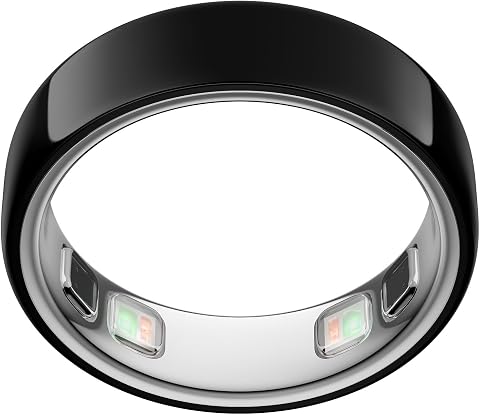
Oura Ring 5 Smart Ring – Black, Size 10
- ✔ Material: Titanium
- ✔ Color and listed size: Black, size 10; proprietary sizing kit required
- ✔ Battery life: Up to 1 week

Fitness Tracker with 24/7 Heart Rate, Blood Pressure, Sleep Tracking, Step Counter
- ✔ Display: 1.1-inch AMOLED HD color touchscreen
- ✔ Battery life: Up to 7 days regular use; up to 15 days standby
- ✔ Charging: Magnetic fast charging
Difficulty: Beginner | Time: 30-60 minutes, plus a few days to check tracking accuracy
What You’ll Need
Tools & Materials:
- A smartphone or other compatible device
- Internet access for checking specifications and downloading the companion app
- A flexible tape measure or a strip of paper and a ruler
- A shortlist of activities and features you want to track
Knowledge:
- Basic familiarity with your phone’s app store and Bluetooth settings
- A general idea of your preferred wrist, daily activities, and budget
Use the manufacturer’s compatibility page to check your phone model and operating system before buying. Decide which features matter most, such as step counts, workout recording, sleep estimates, notifications, or cycle logging. Health measurements from consumer trackers are estimates; they do not diagnose conditions or replace medical advice. Cycle predictions can be inaccurate, and users should treat them as estimates rather than contraception.
WHOOP 5.0 Screenless Fitness, Health & Sleep Wearable – 12-Month Membership
WHOOP 5.0 leads this group because it combines continuous monitoring, recovery coaching and explicitly listed women’s hormonal health features. Menstrual cycle tracking, fertility integration and hormonal insights give it the clearest fit for readers who want training and sleep patterns considered alongside cycle-related context. Its AI coaching draws on more than 140 metrics, including heart rate, HRV, respiratory rate, blood oxygen and skin temperature, making this a more analysis-oriented choice than the Moremore touchscreen tracker.The screenless design is a practical advantage if notifications and glowing displays feel distracting during workouts or overnight wear. Battery life is listed at 14 days or more, and its waterproof PowerPack charges wirelessly on the wrist. The tradeoff is that we cannot glance down for a live readout: WHOOP’s value depends on reviewing insights through its connected experience. It also requires a 12-month membership for full features, a more substantial commitment than simply choosing a device format. Compared with Oura, WHOOP provides more explicit cycle-related detail in the supplied feature list; Oura may appeal more to someone who prioritizes a ring over a wrist band.
Pros:
- Menstrual cycle tracking, hormonal health insights and fertility integration are listed.
- More than 140 metrics inform personalized AI coaching.
- 14+ days of battery life and waterproof wireless wrist charging.
- Screenless form supports a low-distraction, all-day routine.
Cons:
- Full features require a paid 12-month membership.
- No display for checking stats directly on the device.
- The emphasis on recovery insights may be more than needed for simple step tracking.
Best for: People who want recovery coaching and cycle-related health context in a screenless wearable, and are comfortable with a membership.
Not ideal for: Shoppers who want immediate on-device stats or prefer to avoid a 12-month membership commitment.
Bottom line: WHOOP 5.0 is our strongest all-around choice when cycle-related context and recovery coaching matter more than a screen or membership-free simplicity.
“WHOOP 5.0 is our strongest all-around choice when cycle-related context and recovery coaching matter more than a screen or membership-free simplicity.”
Oura Ring 5 Smart Ring – Black, Size 10
Oura Ring 5 is the pick for readers who want health tracking to blend into everyday wear. Its titanium ring form avoids a screen and wrist band, while its listed coverage spans more than 50 metrics across sleep, activity, stress, heart, metabolic and women’s health. That breadth gives it a wider health-tracking frame than Moremore’s activity-focused feature list, though the supplied details do not spell out specific menstrual or fertility tools as WHOOP does.Battery life is listed at up to one week, and the ring is water resistant with an IP68 rating. This compact form comes with a fit-related hurdle: Oura requires its proprietary sizing kit, so we should not assume the listed size corresponds to an ordinary jewelry size. The first month of membership is included, but ongoing membership is required for full functionality. Compared with WHOOP, Oura is better suited to someone who prefers a ring and broad health metrics over an explicit cycle-tracking feature set; compared with Moremore, it sacrifices a visible display and sport-mode list for a more discreet format.
Pros:
- Titanium construction in a compact, screen-free ring format.
- Tracks more than 50 health metrics across several categories.
- Up to one week of battery life and IP68 water resistance.
- Women’s health is included among its metric areas.
Cons:
- A proprietary sizing kit is needed to find the correct fit.
- Full functionality requires a membership after the first included month.
- Specific cycle and fertility capabilities are not detailed in the supplied information.
Best for: People who prefer a compact ring to a wrist wearable and want broad sleep, activity and health tracking.
Not ideal for: Anyone who wants direct screen feedback, avoids subscriptions, or does not want to use a sizing kit.
Bottom line: Oura Ring 5 makes the most sense when discreet ring wear and broad health tracking outweigh the need for explicit cycle tools or on-device feedback.
“Oura Ring 5 makes the most sense when discreet ring wear and broad health tracking outweigh the need for explicit cycle tools or on-device feedback.”
Fitness Tracker with 24/7 Heart Rate, Blood Pressure, Sleep Tracking, Step Counter
Moremore is the accessible, display-first choice in this lineup. Its 1.1-inch AMOLED touchscreen makes activity information and notifications easier to check on the wrist than on WHOOP or Oura, both of which are screenless. Twenty-five sport modes, step counting and reminders cover familiar everyday needs without requiring a reader to make recovery coaching the center of the experience. For someone new to wearables, visible controls and a conventional band format may feel more immediately understandable.It also lists continuous heart-rate, blood-pressure and blood-oxygen monitoring, plus sleep analysis. These are measurements to view as wellness information, not a substitute for clinical assessment. Battery life is up to seven days of regular use, and magnetic charging avoids a conventional plug connection. The compromises are meaningful: there is no built-in GPS, so location data relies on a phone, and the provided feature list has no explicit menstrual or hormonal health tools. Unlike the premium-feeling ring materials of Oura or WHOOP’s extensive recovery coaching, Moremore is geared toward seeing basic activity and notifications. It is the practical pick when screen access matters more than detailed women’s health context.
Pros:
- Bright 1.1-inch AMOLED touchscreen for quick on-wrist checks.
- Tracks heart rate, blood pressure, SpO₂, sleep and steps.
- Twenty-five sport modes and smart notifications are listed.
- Up to seven days of use per charge with magnetic fast charging.
Cons:
- No built-in GPS; location tracking depends on a phone.
- Women’s cycle or hormonal features are not specified.
- Compatibility is listed for Android 5.0+ and iOS 9.0+ devices.
Best for: Beginners who want an easy-to-read wrist display, everyday activity tracking, sport modes and phone notifications.
Not ideal for: People who need built-in GPS, specifically want cycle or fertility insights, or prefer a discreet screenless wearable.
Bottom line: Moremore is the simplest screen-led entry point here, provided we are comfortable relying on a phone for location and do not need dedicated cycle insights.
“Moremore is the simplest screen-led entry point here, provided we are comfortable relying on a phone for location and do not need dedicated cycle insights.”
As an Amazon Associate we earn from qualifying purchases.
Before You Start
Write down your top three needs and a spending limit. Check whether the device requires a subscription for features you want, and review its battery life, charging method, return window, and water resistance rating. Water resistance varies by model and does not always mean the tracker is suitable for swimming, hot showers, or diving. Read the specific use limits. If you have a skin sensitivity, check band materials and plan to keep the area beneath the band clean and dry.
Step-by-Step Instructions
Step 1: List the activities you want to track
Choose the activities you do now or plan to do regularly, such as walking, running, strength training, cycling, swimming, or dance. Add any everyday information you want to see, such as steps, sleep estimates, or phone alerts. Rank the features by importance. A short priority list helps you compare devices without paying for functions you are unlikely to use.
Tip: If you mainly want reminders to move, a simple tracker may be enough. If you want workout maps, consider whether the device has built-in GPS or relies on your phone.
Check: You have a ranked list of three or fewer must-have features and a clear budget.
Step 2: Measure your wrist and compare device fit
Wrap a flexible tape around the wrist where you plan to wear the tracker, keeping it snug without pressing into your skin. If you use paper, mark where it overlaps, then measure the strip with a ruler. Compare your measurement with the manufacturer’s band-size chart. Check the case width and thickness as well as the band range; two bands that fit the same wrist can feel very different.
Tip: Look for adjustable bands and a return option if you cannot try the device in person. A tracker should stay in place during movement without pinching or leaving deep marks.
Check: Your wrist measurement falls within the listed band range, and the device dimensions seem comfortable for your wrist.
Step 3: Check phone, app, and feature compatibility
Open the manufacturer’s compatibility page and confirm that the tracker supports your phone and operating system. Check which features require the companion app, an account, a paid plan, or a connection to another service. For cycle tracking, read what the app records, how it uses your data, and whether you can delete or export that information. Check privacy settings before entering personal health details.
Tip: A feature name can describe different things across brands. For example, cycle logging may record dates and symptoms without measuring ovulation or providing clinically validated health advice.
Check: The device works with your phone, and you know which desired features are free, paid, or unavailable.
Step 4: Compare your shortlisted trackers
Compare two or three models against your priorities. Review the listed sensors and workout modes, battery life, charging time, display readability, band replacement options, water rating, and warranty. Look for independent reviews that discuss comfort and tracking behavior during activities similar to yours. Do not assume that a smaller device has the same sensors or battery life as a larger version in the same product line.
Tip: Treat heart rate, calorie, sleep, and step readings as estimates. If you have a health condition or need data for a medical decision, ask a clinician whether a consumer wearable is suitable for that purpose.
Check: You can explain why your chosen model fits your budget, wrist, phone, and main activities.
Step 5: Install the app and pair the tracker
Charge the tracker, install its official companion app, and create or sign in to an account. Follow the app’s pairing instructions, granting Bluetooth access when requested. Install available device updates before changing settings. Set your preferred units, time format, wrist, and notification choices. Turn off alerts you do not need so the device does not interrupt workouts or rest.
Tip: Pair through the companion app unless the manufacturer specifically directs you to use the phone’s Bluetooth menu. Pairing through both routes can create duplicate or failed connections.
Check: The app shows the tracker as connected, displays its battery level, and completes any required update.
Step 6: Wear the tracker and set a comfortable fit
Fasten the band so the sensor rests against your skin and the device does not slide freely. For everyday wear, leave enough room for comfort and normal wrist movement. During workouts, follow the manufacturer’s placement guidance; some optical heart rate sensors need a closer fit above the wrist bone. Remove the device periodically to wash and dry your wrist and the band.
Tip: Loosen or remove the band if you notice irritation, numbness, swelling, or persistent pressure marks. Stop wearing it over broken or inflamed skin, and contact a health professional if a reaction continues.
Check: The tracker stays in place during arm movement without causing pain, tingling, or skin irritation.
Step 7: Set goals and optional cycle or health features
Choose an achievable activity goal based on your current routine, then adjust it after you have several days of baseline data. Set workout reminders or sleep schedules only if they are useful to you. If you choose cycle tracking, enter dates only if you are comfortable storing that information in the app. Review notification, sharing, and data deletion controls before saving health details.
Tip: Avoid setting a step or calorie target based on a generic recommendation if it conflicts with guidance from your clinician or feels unsustainable. Menstrual cycle length and symptoms vary; predictions may not match your experience.
Check: Your goals are visible in the app, and optional health features and privacy settings match your preferences.
Step 8: Check tracking during your normal routine
Wear the tracker through several ordinary days and record a few activities you can compare with familiar references, such as a known walking route or a timed workout. Check whether workouts start and stop correctly, whether the app syncs, and whether the battery lasts as described. Look for consistent patterns rather than expecting every measurement to match another device exactly.
Tip: Wrist-based step counts can be affected by pushing a stroller, holding a rail, or making repeated arm movements. Heart rate readings can vary with fit, movement, temperature, and skin contact.
Check: The tracker records and syncs your intended activities, feels comfortable, and provides information you can use.
Common Mistakes to Avoid
- Buying based on a feature list without checking phone compatibility or subscription costs. — Check the manufacturer’s compatibility page and the current plan details before purchase. Confirm that your preferred features work without extra fees if that matters to you.
- Choosing a band or case that is uncomfortable for all-day wear. — Measure your wrist, review case dimensions, and check the return policy. Stop wearing a band that causes pain or lasting irritation.
- Treating estimated calories, sleep stages, or cycle predictions as exact health results. — Use readings to notice broad patterns, not to diagnose a condition or make medical decisions. Discuss health concerns with a qualified clinician.
- Setting ambitious goals before learning your usual activity level. — Begin with a manageable target and review your baseline after several days. Raise the target gradually if it remains comfortable.
Troubleshooting
Problem: The app cannot find or connect to the tracker.
Solution: Charge the device, keep it near the phone, and check that Bluetooth is on. Close and reopen the companion app, then follow its pairing steps. If the tracker is already listed in the phone’s Bluetooth settings, remove that pairing only if the manufacturer’s instructions recommend it, then pair again through the app.
Problem: The tracker records few steps or misses a workout.
Solution: Check that the band is secure and that the correct wrist and activity settings are selected. Start a workout manually if automatic detection is unreliable. Review the app’s sync status and permissions, then compare results across several sessions before changing your routine.
Problem: Heart rate readings jump or disappear during exercise.
Solution: Adjust the band so the sensor maintains skin contact without pinching, and follow the maker’s placement instructions. Wipe sweat from the sensor and skin, then try again. If readings remain inconsistent, use another measurement method for that workout and contact the manufacturer about device support.
Problem: The battery drains faster than expected.
Solution: Check battery settings and review use of GPS, always-on display, frequent notifications, and continuous health measurements. Turn off features you do not use, install any available updates, and compare battery life with the manufacturer’s stated conditions.
What Success Looks Like
Your tracker is comfortable to wear, pairs reliably with your phone, and records the activities you chose. Its app syncs data, your goals and optional privacy settings are configured, and you understand that health readings are estimates. After several days, you can identify useful patterns without relying on a single reading as a diagnosis.
Next Steps
Review your activity patterns after one or two weeks and adjust goals to a level you can maintain. Clean and dry the band regularly according to the manufacturer’s care instructions, charge it before long workouts, and check for app or device updates. Revisit notification and data sharing settings if your preferences change. Contact the manufacturer for persistent syncing or hardware faults; ask a clinician about health questions that tracker data raises.
Frequently Asked Questions
Do I need a tracker made specifically for women?
No. Choose a device based on wrist fit, comfort, phone compatibility, activity features, and price. Some models or apps offer cycle logging, but those features vary and may be available on general-purpose trackers as well.
Can a fitness tracker predict ovulation or prevent pregnancy?
Cycle features may estimate dates from information you enter, but predictions can be wrong and should not be treated as contraception or a confirmed ovulation test. Ask a qualified clinician about reliable pregnancy prevention or fertility questions.
How tight should I wear the tracker?
It should maintain contact with your skin without pinching or restricting wrist movement. Follow the manufacturer’s instructions for workout fit, and loosen or remove it if you feel pain, tingling, or lasting skin irritation.
Are tracker calorie and sleep numbers accurate?
They are estimates, and results can vary by device, fit, activity, and individual. Use repeated readings to follow broad patterns. Do not use them as the sole basis for medical, nutrition, or training decisions.
Can I wear a fitness tracker in water?
Check the exact water resistance rating and usage limits for your model. A water resistant label does not automatically mean it is suitable for swimming, showering, or diving.